
HP ProLiant DL385 Generation 5 Server Maintenance and Service Guide






Removal and replacement procedures 57
o
Processor 2 can be installed without memory.
o Any memory installed into banks for processor 2 can be used only if processor 2 is installed.
CAUTION: Always wear an antistatic wrist strap when working inside the server.
DIMM population order
Configuration Bank A
1A and 2A
Bank B
3B and 4B
Bank C
5C and 6C
Bank D
7D and 8D
Single processor 1st 2nd — —
Dual processor 1st 3rd 2nd 4th
Installing DIMMs
1. Power down the server (on page 28).
2. Extend the server from the rack (on page 27).
3. Remove the access panel ("Access panel" on page 30).
4. Remove the air baffle.
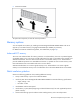
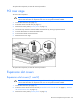
5. Open the DIMM slot latches.
IMPORTANT: Always install memory in pairs of two identical DIMMs.
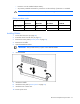
6. Install the DIMM.
7. Install the air baffle.
8. Install the access panel ("Access panel" on page 30).
9. Install the server into the rack.
10. Power up the server.