
HP ProLiant DL385 Generation 5 Server Maintenance and Service Guide






Removal and replacement procedures 56
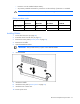
5.
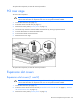
Remove the DIMM.
To replace the component, reverse the removal procedure.
Memory options
You can expand server memory by installing PC2-5300 Registered DDR2 SDRAM DIMMs. The server
supports up to 32 GB of memory using eight 4-GB DIMMs (four DIMMs per processor).
For DIMM slot locations and bank assignments, see "DIMM slots (on page 90)."
Advanced ECC memory
This server uses Advanced ECC for memory protection. In Advanced ECC, the server is protected against
correctable memory errors. The server provides notification if the level of correctable errors exceeds a pre-
defined threshold rate. The server does not fail because of correctable memory errors. Advanced ECC
provides additional protection over Standard ECC because it is possible to correct certain memory errors
that would otherwise be uncorrectable and result in a server failure.
Whereas standard ECC can correct single-bit memory errors, Advanced ECC can correct single-bit
memory errors and multi-bit memory errors if all failed bits are on the same DRAM device on the DIMM.
DIMM installation guidelines
Observe the following guidelines when installing additional memory:
• Always install memory in pairs of two identical DIMMs.
• Install only ECC PC2-5300 Registered DDR2 SDRAM DIMMs that meet the following specifications:
o Supply voltage: 1.8 V
o Bus width: 72 bits
• Install DIMMs with the same speed.
• Install memory in pairs (banks) beginning with banks farthest away from each populated processor
(banks A and C).
• Observe the following special conditions when installing memory with a second processor: