
HP ProLiant DL385 Generation 2 Server Maintenance and Service Guide

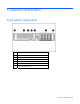

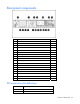
Table Of Contents
- HP ProLiant DL385 Generation 2 Server Maintenance and Service Guide
- Notice
- Contents
- Customer self repair
- Illustrated parts catalog
- Removal and replacement procedures
- Required tools
- Safety considerations
- Preparation procedures
- Access panel
- SAS hard drive blank
- Hot-plug SAS hard drive
- Power supply blank
- Hot-plug power supply
- DC power supply
- Media drive or blank
- Hot-plug fan
- Power supply cage assembly
- Battery-backed write cache procedures
- Air baffle
- Processor fan bracket
- Front bezel
- Systems Insight Display
- Fan board
- Processor fan bracket plate
- Media drive ejector assembly
- PPM
- PPM retainer
- Heatsink
- Processor
- DIMMs
- Power supply backplane
- Hard drive backplane
- Hard drive backplane retainer
- PCI riser cage
- Expansion slot covers
- Expansion slot cover retainer (slots 1 and 2)
- Expansion boards
- Battery
- System board
- I/O fan bracket
- Cabling
- Diagnostic tools
- Component identification
- Front panel components
- Front panel LEDs and buttons
- Rear panel components
- Rear panel LEDs and buttons
- System board
- Systems Insight Display LEDs
- Systems Insight Display LEDs and internal health LED combinations
- Device numbers
- SAS and SATA hard drive LEDs
- SAS and SATA hard drive LED combinations
- PCI riser cage LED
- Battery pack LEDs
- Hot-plug fans (6-fan configuration)
- Hot-plug fans (12-fan configuration)
- Fan board components
- Specifications
- Acronyms and abbreviations

Diagnostic tools 84
Integrated Management Log
The IML records hundreds of events and stores them in an easy-to-view form. The IML timestamps each
event with 1-minute granularity.
You can view recorded events in the IML in several ways, including the following:
• From within HP SIM ("HP Systems Insight Manager" on page 83)
• From within Survey Utility
• From within operating system-specific IML viewers
o For NetWare: IML Viewer
o For Windows®: IML Viewer
o For Linux: IML Viewer Application
• From within the iLO 2 user interface
• From within HP Insight Diagnostics (on page 86)
For more information, refer to the Management CD in the HP ProLiant Essentials Foundation Pack.
Integrated Lights-Out 2 technology
The iLO 2 subsystem is a standard component of selected ProLiant servers that provides server health and
remote server manageability. The iLO 2 subsystem includes an intelligent microprocessor, secure memory,
and a dedicated network interface. This design makes iLO 2 independent of the host server and its
operating system. The iLO 2 subsystem provides remote access to any authorized network client, sends
alerts, and provides other server management functions.
Using iLO 2, you can:
• Remotely power up, power down, or reboot the host server.
• Send alerts from iLO 2 regardless of the state of the host server.
• Access advanced troubleshooting features through the iLO 2 interface.
• Diagnose iLO 2 using HP SIM through a web browser and SNMP alerting.
For more information about iLO 2 features, refer to the iLO 2 documentation on the Documentation CD or
on the HP website (http://www.hp.com/servers/lights-out
).
Option ROM Configuration for Arrays
Before installing an operating system, you can use the ORCA utility to create the first logical drive, assign
RAID levels, and establish online spare configurations.
The utility also provides support for the following functions:
• Reconfiguring one or more logical drives
• Viewing the current logical drive configuration
• Deleting a logical drive configuration
• Setting the controller to be the boot controller