
ProLiant DL 380 Maintenance and Service Guide

3-32 Compaq ProLiant DL380 Maintenance and Service Guide
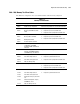
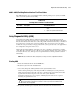
6600 – 6699, SCSI/IDE CD-ROM Drive Test Error Codes
The 6600 series of diagnostic error codes identifies failures with the CD-ROM drive cabling,
CD-ROM drives, adapter boards, or the system board assembly.
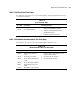
Table 3-13
SCSI/IDE CD-ROM Drive Test Error Codes
Error Code Description Recommended Action
6600-xx
6605-xx
6608-xx
CD-ROM ID failed.
CD-ROM read failed.
SCSI controller test.
6605-xx CD-ROM read failed.
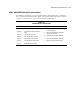
1. Replace the CD-ROM media and retest.
2. Check and/or replace the signal cable and
retest.
3. Check the switch settings on the adapter
board (if applicable).
4. Replace the SCSI controller (if applicable)
and retest.
5. Replace the CD-ROM drive and retest.
6. Replace the system board and retest.
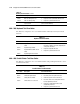
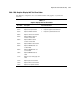
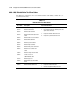
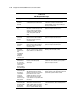
6700 – 6799, SCSI Tape Drive Test Error Codes
The 6700 series of diagnostic error codes identifies failures with tape cartridges, tape drives,
media changers, tape drive cabling, adapter boards, or the system board assembly.
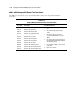
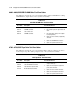
Table 3-14
SCSI Tape Drive Test Error Codes
Error Code Description Recommended Action
6700-xx SCSI tape ID drive types test failed.
6706-xx SCSI disk SA/media test failed.
6709-xx SCSI disk erase tape test failed.
6728-xx Media load/unload test failed.
1. Run the System Configuration Utility and
verify the drive type.
2. Replace the SCSI tape drive signal and
power cables and retest.
3. Replace the SCSI controller and retest.
4. Replace the SCSI tape drive and retest.
5. Replace the system board and retest.