
ProLiant DL 380 Maintenance and Service Guide
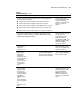



3-22 Compaq ProLiant DL380 Maintenance and Service Guide
Table 3-2
POST Error Messages
continued
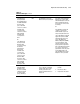
Error Code Audible Beeps Probable Source of Problem Recommended Action
1795-Drive Array -
Array Accelerator
Configuration Error.
Data does not
correspond to this
drive array. Array
Accelerator is
temporarily disabled.
None This indicates that while the
system was in use, power was
interrupted while data was in the
array accelerator memory.
The data stored in the array
accelerator does not correspond
to this drive array.
Match the array accelerator to
the correct drive array, or run
the System Configuration Utility
to clear the data in the array
accelerator.
1796-Drive Array -
Array Accelerator Not
Responding.
Array Accelerator is
temporarily disabled.
None Array accelerator is defective or
has been removed.
1. Check that the array
accelerator is properly
seated.
2. Run the System
Configuration Utility to
reconfigure the Compaq
IDA-2 without the array
accelerator.
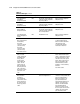
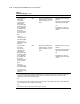
1797-Drive Array -
Array Accelerator
Read Error Occurred.
Data in Array
Accelerator has been
lost. Array
Accelerator is
disabled.
None Hard parity error while reading
data from posted-writes
memory.
Enable array accelerator.
1798-Drive Array -
Array Accelerator
Write Error Occurred.
Array Accelerator is
disabled.
None Hard parity error while writing
data to posted-writes memory.
Enable array accelerator.
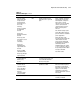
1799-Drive Array -
Drive(s) Disabled due
to Array Accelerator
Data Loss. Select F1
to continue with
logical drives
disabled. Select F2 to
accept data loss and
to re-enable logical
drives.
None Volume failed due to loss of data
in posted-writes memory.
Press F1 to continue with
logical drives disabled or F2 to
accept data loss and re-enable
logical drive.
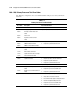
Beeps only: 2 Long 2 long No valid memory is present in
the system.
Replace failed memory with
valid memory.
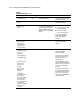
Beeps only: 2 Long +
2 Short
2 long, 2 short Power is cycled. Temperature too
hot. Processor fan not installed
or spinning.
Check fans.
(Run System
Configuration Utility -
F10 key)
None A configuration error occurred
during POST.
Press F10 to run System
Configuration Utility.
(RESUME - F1 key) None As indicated to continue
Press F1.