
ProLiant DL 380 Maintenance and Service Guide



Diagnostics and Troubleshooting 3-19
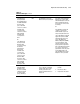
Table 3-2
POST Error Messages
continued
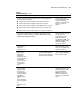
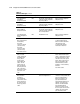
Error Code Audible Beeps Probable Source of Problem Recommended Action
1786-Drive Array
Recovery Needed
The following drive(s)
need Automatic Data
Recovery: SCSI
port 1, SCSI ID O
Select F1 to continue
automatic data
recovery to drive.
Select F2 to continue
without starting
automatic data
recovery data to
drive.
Or
Slot 1 Drive Array
Recovery needed.
Automatic data
recovery previously
aborted. The
following SCSI
drive(s) need
automatic data
recovery; SCSI
port 1; SCSI ID 0.
Select F1 to retry
Automatic Data
Recovery to drive.
Select F2 to continue
without starting
Automatic Data
Recovery to drive.
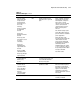
None Interim Data Recovery mode.
Data has not been recovered yet.
Press F1 to start the Automatic
Data Recovery to begin. Data
will automatically be restored to
drive X now that the drive has
been replaced or now seems to
be working.
Or
Press F2 and the system will
continue to operate in the
Interim Data Recovery mode.
The previously aborted version
of the 1786 POST message will
appear if the previous rebuild
attempt was aborted for any
reason. Run Drive Array
Advanced Diagnostics (DAAD)
for more information. If the
replacement drive was failed,
try using another replacement
drive. If rebuild was aborted due
to a read error from another
physical drive in the array, back
up all readable data on the
array. Run Diagnostics Surface
Analysis to restore your data.
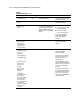
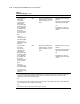
1787-Slot x Drive
Array Operating in
Interim Recovery
Mode. The following
SCSI drive(s) should
be replaced: SCSI
port (y): SCSI ID (x)
None Hard drive X failed or cable is
loose or defective. Following a
system restart, this message
reminds you that drive X is
defective and fault tolerance is
being used.
1. Replace drive X as soon as
possible.
2. Check loose cables.
3. Replace defective cables.
continued