
ProLiant DL 380 Maintenance and Service Guide



3-18 Compaq ProLiant DL380 Maintenance and Service Guide
Table 3-2
POST Error Messages
continued
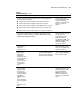
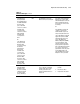
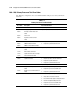
Error Code Audible Beeps Probable Source of Problem Recommended Action
1781-Disk 1 Failure None Hard drive/format error Run Diagnostics. Replace failed
assembly as indicated.
1782-Disk Controller
Failure
None Hard disk drive circuitry error Run Diagnostics. Replace failed
assembly as indicated.
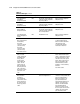
1783-Slot x Drive
Array Controller
Failure
None ROM installation problem or array
accelerator board problem. If this
message appears immediately
following a ROM installation, the
ROM is defective or not installed
properly.
Check to see if:
■ The array accelerator board
is attached properly.
■ The array controller is
firmly inserted in its slot.
If error recurs, upgrade the
System ROMs. Otherwise,
replace the Smart Array
Controller.
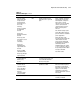
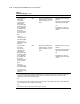
1784-Drive Array
Drive Failure The
following SCSI
drive(s) should be
replaced; SCSI
port (y) SCSI ID (x)
None Defective drive and/or cables Check for loose cables. Replace
defective drive X and/or
cable(s).
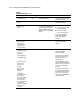
1785-Drive Array not
Configured (followed
by one of the
following)
Run Compaq Array
Configuration Utility
No drives detected.
Drive positions
appear to have
changed.
Drive positions
appear to have
changed.
Configuration
information indicates
drive positions
beyond the capability
of this controller.
This may be due to
drive movement from
a controller that
supports more drives
than the current
controller.
None Configuration error See actions below.
Run the Compaq Array
Configuration Utility.
Turn off the system and check
the SCSI cable connections to
make sure the drives are
attached properly.
Run Array Diagnostic Utility if
previous positions are unknown.
Then turn system power Off and
move drives to their original
positions.
To avoid data loss turn system
power Off and reattach drives to
the original controller firmware
to the version on the original
controller using Option ROMPaq.
Select F1 to resume.
continued