
ProLiant DL 380 Maintenance and Service Guide



3-16 Compaq ProLiant DL380 Maintenance and Service Guide
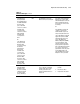
Table 3-2
POST Error Messages
continued
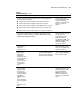
Error Code Audible Beeps Probable Source of Problem Recommended Action
1771-Primary Disk
Port Address
Assignment Conflict
None Internal and external hard drive
controllers are both assigned to
the primary address.
Run the System Configuration
Utility and correct.
1771-Primary Disk
Port Address
Assignment Conflict
None Internal and external hard drive
controllers are both assigned to
the primary address.
Run the System Configuration
Utility and correct.
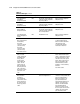
1772-Secondary
Disk Port Address
Assignment Conflict
None Address Assignment Conflict.
Internal and external hard drive
controllers are both assigned to
the secondary address.
Run the System Configuration
Utility and correct.
1773-Primary Fixed
Disk Port Assignment
Conflict
None Fixed disk drive error Run the System Configuration
Utility and correct.
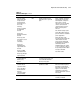
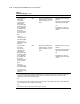
1774-Slot x Drive
Array - Obsolete data
found in Array
Accelerator.
Select F1 to discard
contents of Array
Accelerator.
Select F2 to write
contents of Array
Accelerator to drives.
None SMART-2 Controller error Data found in array accelerator
is older than data found on
drives. Press F1 to discard the
older data in the array
accelerator and retain the
newer data on the drives.
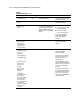
1775-Slot x Drive
Array - ProLiant
Storage System Not
Responding SCSI
Port (y): Check
storage system
power switch and
cables. Turn the
system power off
while checking the
ProLiant power and
cable connections,
then turn the system
power back on to
retry.
None Storage system problem Turn off power to system.
Check external ProLiant power
switch – external drives must all
be powered up before or at the
same time as the main system.
Check cables. If retry does not
help, try replacing the cable,
ProLiant firmware, ProLiant
backplane, or the Smart Array
Controller.
Press F1 to resume.
1776-Slot x Drive
Array- SCSI Bus
Termination
Error-internal and
external drive cannot
both be attached to
the same SCSI port.
SCSI port (y). Check
cables.
None External and internal SCSI drives
are both configured Port 1.
The internal and external
connectors of the specified SCSI
port(s) are both attached to
drives. The SCSI bus is not
properly terminated when
internal and external drives are
attached concurrently to the
SCSI bus. The indicated SCSI
bus is disabled until this
problem is resolved. Turn off
the server power and check the
cabling to the specified SCSI
port. Press F1 to resume.
continued