
ProLiant DL 380 Maintenance and Service Guide



Diagnostics and Troubleshooting 3-15
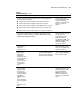
Table 3-2
POST Error Messages
continued
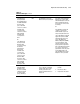
Error Code Audible Beeps Probable Source of Problem Recommended Action
1764-Slot x Drive Array - Capacity Expansion Process is temporarily disabled
(followed by one of the following):
■ Expansion will resume when Array Accelerator has been reattached.
■ Expansion will resume when Array Accelerator has been replaced.
■ Expansion will resume when Array Accelerator RAM allocation is successful.
■ Expansion will resume when Array Accelerator battery reaches full charge.
■ Expansion will resume when automatic data recovery has been completed.
Reattach or replace array
accelerator, wait until the array
accelerator batteries have
charged, or for Automatic Data
Recovery to complete, as
indicated.
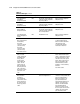
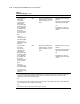
1767-Slot x Drive Array Option ROM is Not Programmed Correctly or may Conflict
with the Memory Address Range of an ISA Card. Check the Memory Address
Configuration of installed ISA Card(s) or run Options ROMPaq Utility to attempt
SMART-2/E Option ROM Reprogramming.
Remove or reconfigure
conflicting ISA cards, especially
any cards that are not
recognized by the System
Configuration Utility. Try
reprogramming the ROM on the
SMART-2/E Controller using the
latest Options ROMPaq
(version 2.29 or higher).
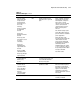
1768-Slot x Drive
Array-Resuming
logical drive
expansion process.
None SMART-2 Controller error No action required. Appears
whenever a controller reset or
power cycle occurs while array
expansion is in progress.
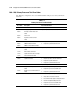
1769-Slot x Drive
Array - Drive(s)
disabled due to
failure during
expand. Select F1 to
continue with logical
drives disabled.
Select F2 to accept
data loss and to
re-enable logical
drives.
None SMART-2 Controller error. Data
has been lost while expanding
the array; therefore, the drives
have been temporarily disabled.
Press F2 to accept the data loss
and re-enable the logical drives.
Restore data from backup.
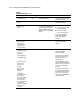
1770-Slot x drive
array critical drive
firmware problem
detected. Please
upgrade firmware on
the following drive(s)
using Options
ROMPaq (available
from
www.compaq.com);
SCSI port (y) SCSI ID
(x)
(RESUME=F1 or F2
KEY)
None Needs firmware update The indicated drives are running
firmware that is known to cause
intermittent problems. Please
use the Compaq Options
ROMPaq utility to upgrade
firmware on all drives to the
latest revision. Press F1 or F2 to
resume.
continued