
ProLiant DL 380 Maintenance and Service Guide




3-14 Compaq ProLiant DL380 Maintenance and Service Guide
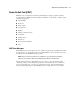
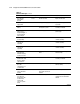
Table 3-2
POST Error Messages
continued
Error Code Audible Beeps Probable Source of Problem Recommended Action
* 1727-Slot x Drive
Array – New Logical
Drive(s) Attachment
Detected. If more
than 32 logical
drives, this message
will be followed by:
Auto-configuration
failed: Too many
logical drives.
None Controller has detected an
additional array of drives that
was attached when the power
was off. The logical drive
configuration information has
been updated to add the new
logical drives. The maximum
number of logical drives
supported is 32. Additional
logical drives will not be added to
the configuration.
Press F1 to resume.
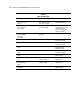
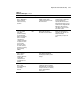
1729-Disk
consistency
initialization in
progress RAID 4/5
performance may be
lower until Auto
Reliability Monitoring
has completed
automatic parity
consistency
initialization.
None This message is normal
following the initial
configuration of RAID 4 or
RAID 5 logical drives. This POST
message will go away and
performance of the controller
will improve after the parity data
has been initialized by ARM (an
automatic process that runs in
the back ground on the
controller.)
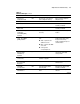
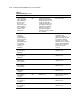
1730-Fixed Disk 0
does not support
DMA Mode.
None Hard drive error Run the System Configuration
Utility and correct.
1731-Fixed Disk 1
does not support
DMA Mode.
None Hard drive error Run the System Configuration
Utility and correct.
1740-Fixed Disk 0
failed Set Block
Mode command
None Hard drive error Run the System Configuration
Utility and correct.
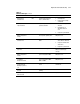
1741-Fixed Disk 1
failed Set Block
Mode command
None Hard drive error Run the System Configuration
Utility and correct.
1750-Fixed Disk 0
failed Identify
command
None Hard drive error Run the System Configuration
Utility and correct.
1751-Fixed Disk 1
failed Identify
command
None Hard drive error Run the System Configuration
Utility and correct.
1760-Fixed Disk 0
does not support
Block Mode
None Hard drive error Run the System Configuration
Utility and correct.
1761-Fixed Disk 1
does not support
Block Mode
None Hard drive error Run the System Configuration
Utility and correct.
continued