
ProLiant DL 380 Maintenance and Service Guide



Diagnostics and Troubleshooting 3-7
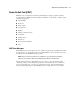
Power-On Self-Test (POST)
POST is a series of diagnostic tests that run automatically on Compaq computers when the
system is turned on. POST checks the following assemblies to ensure that the computer system
is functioning properly:
■ System ROM
■ Keyboard
■ Power supply
■ System board
■ Memory
■ Memory expansion boards
■ Controllers
■ Diskette drives
■ Hard drives
■ Processor Power Modules
■ Fans
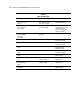
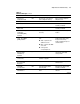
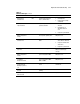
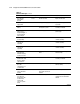
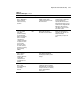
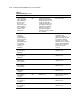
POST Error Messages
If POST finds an error in the system, an error condition is indicated by an audible and/or visual
message. If an error code displays on the screen during POST or after resetting the system, use
the instructions in the POST Error Messages table.
NOTE: Many of the actions listed require you to run Diagnostics or the Compaq System Configuration
Utility. Steps for running these utilities are provided following the POST Error Messages tables.
The Recommended Action column lists the steps necessary to correct the problem. After
completing each step, run the Diagnostics program to verify whether the error condition has
been corrected. If the error code reappears, perform the next step, then run the Diagnostics
program again. Follow this procedure until Diagnostics no longer detects an error condition.