
ProLiant DL 380 Maintenance and Service Guide

2-40 Compaq ProLiant DL380 Maintenance and Service Guide
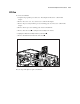
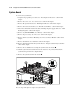
To replace the system board battery:
1. Complete the preparation procedures. See “Powering Down the Server” earlier in this
chapter.
2. Remove the server cover. See “Server Cover” earlier in this chapter.
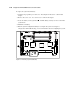
3. Locate the battery on the system board . Pull the battery sideways to remove it from the
system board.
4. Install the new battery.
5. Run the System Configuration Utility to reconfigure the system. See Chapter 3,
“Diagnostics and Troubleshooting,” for more information about reconfiguring the system.
1
Figure 2-32. Removing a system board battery