
ProLiant DL 380 Maintenance and Service Guide

2-38 Compaq ProLiant DL380 Maintenance and Service Guide
System Board
To remove the system board:
1. Complete the preparation procedures. See “Powering Down the Server” earlier in this
chapter.
2. Remove the server cover. See “Server Cover” earlier in this chapter.
3. Remove all expansion boards. See “PCI Expansion Board” earlier in this chapter.
4. Remove the riser board and brace. See “Riser Board and Brace” earlier in this chapter.
5. Disconnect all internal and external cables, including all power supply cables. See “Cable
Routing Diagrams” earlier in this chapter.
6. Remove any SDRAM DIMMs. See “Memory” earlier in this chapter.
7. Remove the processor(s). See “Processor” earlier in this chapter.
8. Remove the Processor Power Module(s). See “Processor Power Module” earlier in this
chapter.
9. Remove the CPU fan. See “CPU Fan” earlier in this chapter.
10. Remove the Integrated Smart Array Controller. See “Integrated Smart Array Controller”
earlier in this chapter.
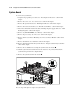
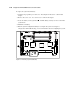
11. Remove the one thumbscrew securing the system board to the chassis .
12. Slide the system board toward the front of the chassis 1.5 cm (.5 inch). Then, lift the
system board up off of the five alignment keys.
13. Remove the system board from the chassis .
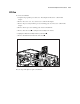
2
1
Figure 2-31. Removing the system board
Reverse steps 1 through 13 to replace the system board.