
ProLiant DL 380 Maintenance and Service Guide

Removal and Replacement Procedures 2-37
WARNING: To reduce the risk of personal injury from hot surfaces, allow the internal system
components to cool before touching.
To remove the Integrated Smart Array Controller:
1. Complete the preparation procedures. See “Powering Down the Server” earlier in this
chapter.
2. Remove the server cover. See “Server Cover” earlier in this chapter.
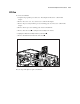
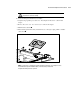
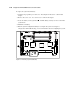
3. Pull the latches outward .
4. When the Integrated Smart Array Controller rises to a 45-degree angle, pull the controller
out of the slot
.
1
1
2
Figure 2-30. Removing the Integrated Smart Array Controller from the system board
NOTE: For instructions on installing the Integrated Smart Array Controller, refer to Chapter 4 of the
ProLiant DL380 Set-Up and Installation Guide, or the instructions provided in the
Integrated Smart Array Controller option kit.