
ProLiant DL 380 Maintenance and Service Guide


Removal and Replacement Procedures 2-33
Processor
CAUTION: Electrostatic discharge can damage electronic components. Be sure you are
properly grounded before beginning any installation procedure. Refer to “Electrostatic
Discharge Information” earlier in this chapter.
To remove a processor:
1. Complete the preparation procedures. See “Powering Down the Server” earlier in this
chapter.
2. Remove the server cover. See “Server Cover” earlier in this chapter.
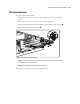
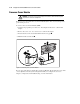
3. Push out the tabs on the processor retaining posts .
4. While pulling the latches outward, lift out the processor .
2
1
Figure 2-27. Removing the processor
To replace the processor, push in on the tabs located at each side of the processor until they
click twice. Then reverse steps 1 through 4. Use the System Configuration Utility to reconfigure
your system if you are replacing a faulty processor. See Chapter 3, “Diagnostics and
Troubleshooting,” for more information.
IMPORTANT: The processor is keyed to ensure correct alignment. Align the pattern of pins in the
processor with the pattern of holes in the slot. The pins and holes will not line up if the processor is
misaligned.