
ProLiant DL 380 Maintenance and Service Guide


Removal and Replacement Procedures 2-31
SDRAM DIMM
CAUTION: Electrostatic discharge can damage electronic components. Be sure you are
properly grounded before beginning any installation procedure. Refer to “Electrostatic
Discharge Information” earlier in this chapter.
To remove an SDRAM DIMM:
1. Complete the preparation procedures. See “Powering Down the Server” earlier in this
chapter.
2. Remove the server cover. See “Server Cover” earlier in this chapter.
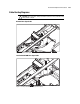
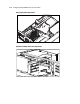
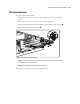
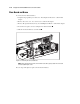
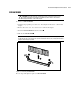
3. Press both SDRAM DIMM slot latches outward .
4. Lift out the SDRAM DIMM .
IMPORTANT: A memory module can be installed only one way. Be sure to match the key slots on the
module with the tabs on the memory slot. Push the module down into the slot, ensuring that the module
is fully inserted and properly seated.
2
1
1
Figure 2-25. Removing an SDRAM DIMM
Reverse steps 1 through 4 to replace an SDRAM DIMM.