
ProLiant DL 380 Maintenance and Service Guide

Removal and Replacement Procedures 2-29
Memory
The following guidelines may be helpful when installing additional memory:
■ The server ships standard with 128-MB Synchronous DRAM (SDRAM) Dual Inline
Memory Module (DIMM) installed in DIMM slot 1.
■ SDRAMS must be 133-MHz, registered, 3.3 volt, 72-bit wide, with Error Correction Code
(ECC). No other DIMMS are compatible with server.
■ Install SDRAM DIMM modules one at a time in the sequential order starting with DIMM
slot 1.
■ Install DIMMs of the same speed. Do not install DIMM modules supporting different
speeds.
■ Use only 64-, 128-, 256-, 512-MB, or, when available, 1-GB SDRAM DIMMs. Any
combination of these SDRAM DIMMs can be used.
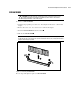
■ Install DIMMs only in one direction. Be sure to match the notch on the module with the
tab on the DIMM slot. Before seating the DIMM in the slot, ensure that the module key is
fully inserted.
■ Memory can be expanded to a maximum of 4-GB of memory.
■ Use only Compaq SDRAM DIMMs. DIMMs from other sources may affect data integrity.