
ProLiant DL 380 Maintenance and Service Guide


2-28 Compaq ProLiant DL380 Maintenance and Service Guide
Riser Board and Brace
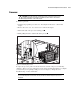
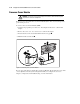
To remove the riser board and brace:
1. Complete the preparation procedures. See “Powering Down the Server” earlier in this
chapter.
2. Remove the server cover. See “Server Cover” earlier in this chapter.
3. Remove all expansion boards, if any. See “PCI Expansion Board ” earlier in this chapter.
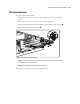
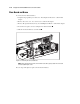
4. Loosen the two captive screws securing the riser board and brace .
5. Lift the riser board and brace out of the unit .
1
2
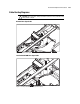
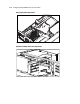
Figure 2-23. Removing the riser board and brace
NOTE: When replacing the riser board, ensure that the riser board is properly seated in the riser board
slot before tightening the screws.
Reverse steps 1 through 5 to replace the riser board and brace.