
ProLiant DL 380 Maintenance and Service Guide


Removal and Replacement Procedures 2-27
PCI Expansion Board
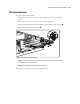
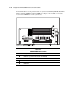
To remove a PCI expansion board:
1. Perform the preparation procedures. See “Powering Down the Server” earlier in this
chapter.
2. Remove the server cover. See “Server Cover” earlier in this chapter.
3. Swing out the expansion board latch securing the expansion board to the riser board .
4. Pull the expansion board from the chassis .
1
2
Figure 2-22. Removing a PCI expansion board
NOTE: If the PCI expansion board is not going to be replaced, then replace the expansion slot cover to
prevent damage to the expansion board slot.
NOTE: Expansion boards may differ from the board shown above.
Reverse steps 1 through 4 to replace a PCI expansion board.