
ProLiant DL 380 Maintenance and Service Guide



2-24 Compaq ProLiant DL380 Maintenance and Service Guide
Optional 2x1-Inch Media Device Drive Cage
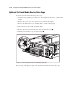
To remove the 2x1-inch media device drive cage:
1. Complete the preparation procedures. See “Powering Down the Server” earlier in this
chapter.
2. Remove the server cover. See “Server Cover” earlier in this chapter.
3. Remove the diskette drive. See “Diskette Drive” earlier in this chapter.
4. Disconnect the power, SCSI, and signal cables.
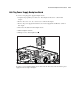
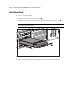
5. Remove the T-15 screw from the side of the 2x1-inch drive cage .
6. Slide the 2x1-inch drive cage out of the chassis .
2
1
Figure 2-17. Removing an optional 2x1-inch media device drive cage
Reverse steps 1 through 6 to replace the optional 2x1-inch media device drive cage.