
ProLiant DL 380 Maintenance and Service Guide



Removal and Replacement Procedures 2-23
Removable Media Blank
Devices that can be installed in the removable media drive include an additional CD-ROM
drive, a SCSI hard drive cage, and SLR, DAT, or DLT tape drives.
To remove a removable media blank:
1. Complete the preparation procedures. See “Powering Down the Server” earlier in this
chapter.
2. Remove the server cover. See “Server Cover” earlier in this chapter.
3. Remove the diskette drive. See “Diskette Drive” earlier in this chapter.
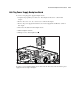
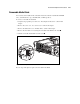
4. Remove the T-15 Torx screw securing the removable media blank to the chassis .
5. Slide the removable media blank out of the server .
1
2
Figure 2-16. Removing the removable media blank
Reverse steps 1 through 5 to replace the removable media blank.