
ProLiant DL 380 Maintenance and Service Guide



2-22 Compaq ProLiant DL380 Maintenance and Service Guide
Low-Profile IDE CD-ROM Drive
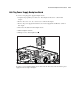
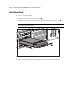
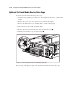
To remove the low-profile IDE CD-ROM drive:
1. Complete the preparation procedures. See “Powering Down the Server” earlier in this
chapter.
2. Remove the server cover. See “Server Cover” earlier in this chapter.
3. Remove the diskette drive. See “Diskette Drive” earlier in this chapter.
4. Disconnect the CD-ROM cable from the CD-ROM drive .
5. Remove the retaining screw securing the CD-ROM drive to the chassis .
6. Pull the CD-ROM drive from the drive cage .
2
3
2
1
Figure 2-15. Removing the low-profile IDE CD-ROM drive
Reverse steps 1 through 6 to replace the low-profile IDE CD-ROM drive.