
ProLiant DL 380 Maintenance and Service Guide



Removal and Replacement Procedures 2-21
SCSI Backplane Board
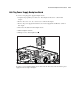
To remove the SCSI backplane board:
1. Complete the preparation procedures. See “Powering Down the Server” earlier in this
chapter.
2. Disconnect the SCSI and power cables from the SCSI backplane board.
3. Remove the drives from the drive cage. See “SCSI Hot-Plug Hard Drive” earlier in this
chapter.
4. Remove the hot-plug drive cage. See “Hot-Plug Drive Cage” earlier in this chapter.
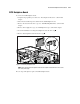
5. Loosen the thumbscrew securing the backplane board to the drive cage .
6. Remove the backplane board from the drive cage .
2
1
Figure 2-14. Removing a backplane board
NOTE: When replacing the SCSI backplane board, slide the backplane board down into the hooks on the
back of the power supply.
Reverse steps 1 through 6 to replace the SCSI backplane board.