
ProLiant DL 380 Maintenance and Service Guide



Removal and Replacement Procedures 2-19
SCSI Hot-Plug Hard Drive
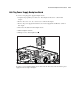
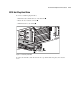
To remove a SCSI hot-plug hard drive:
1. Push in the tab to unlock the lever on the hard drive .
2. Rotate the lever outward, as shown .
3. Pull the hard drive out of the bay .
3
1
2
Figure 2-12. Removing a hard drive
To replace the hard drive, slide the drive into the cage until it clicks into place, then close the
lever.