
ProLiant DL 380 Maintenance and Service Guide


2-14 Compaq ProLiant DL380 Maintenance and Service Guide
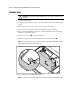
Hot-Plug Power Supply
WARNING: To reduce the risk of electric shock, do not disassemble the power supply or
attempt to repair it. It should be replaced only with the specified spare part.
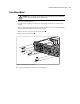
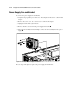
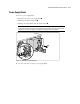
To remove a hot-plug power supply:
1. Unplug the AC power cord.
2. Push in the port-colored lever on the power supply blank .
3. Pull the lever out until it is horizontal .
4. Pull the power supply out the back of the chassis .
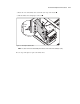
IMPORTANT: A ProLiant DL380 Server ships standard with a single power supply module. The primary
module must populate the outer bay. A power supply blank may populate the inner bay. The blank can be
removed and a second hot-plug power supply installed for redundant power supply capability.
3
1
2
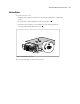
Figure 2-8. Removing a power supply
Reverse steps 1 through 4 to replace a power supply.