
ProLiant DL 380 Maintenance and Service Guide


2-10 Compaq ProLiant DL380 Maintenance and Service Guide
Diskette Drive
CAUTION: When removing or installing the diskette drive, be careful not to damage its front
eject button.
To remove the diskette drive:
1. Complete the preparation procedures. See “Powering Down the Server” earlier in this
chapter.
2. Remove the server cover. See “Server Cover” earlier in this chapter.
3. Disconnect the power and data cables from the diskette drive (if installed).
4. Remove the Power On/Standby switch. See “Power On/Standby Switch with Status
Indicators” earlier in this chapter.
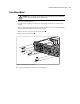
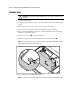
5. Remove one T-15 screw from the diskette drive.
6. Slide the diskette drive back, then away from the front bezel until it stops .
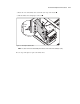
NOTE: Ensure that the diskette eject lever clears the bezel when removing the diskette drive. Slide the
diskette drive straight back from the front of the unit.
2
1
2
Figure 2-4. Removing the screw and sliding the diskette drive
NOTE: The cables from the Power On/Standby switch have been removed from the drawing for clarity.