
ProLiant DL 380 Maintenance and Service Guide


Removal and Replacement Procedures 2-9
Rack-Mount Bezel
WARNING: Before removing the rack-mount bezel, be sure the computer is powered down and
the power cord is disconnected from the electrical outlet.
To remove the rack-mount bezel:
1. Complete the preparation procedures. See “Powering Down the Server” earlier in this
chapter.
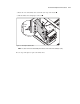
2. Remove the Power On/Standby switch assembly from the bezel. See “Power On/Standby
Switch with Status Indicators” earlier in this chapter.
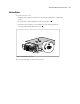
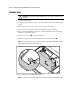
3. Remove the nine screws from the front of the bezel .
4. Remove the rack-mount bezel .
1
2
Figure 2-3. Removing the rack-mount bezel
Reverse steps 1 through 4 to replace the rack-mount bezel.