
ProLiant DL 380 Maintenance and Service Guide


2-8 Compaq ProLiant DL380 Maintenance and Service Guide
Power On/Standby Switch with Status Indicators
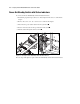
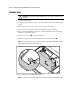
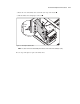
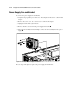
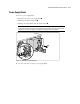
To remove the Power On/Standby switch with status indicators:
1. Perform the preparation procedures. See “Powering Down the Server” earlier in this
chapter.
2. Remove the server cover. See “Server Cover” earlier in this chapter.
3. Disconnect the power switch cable from the system board .
4. Press in on the two tabs on the top and bottom of the switch .
5. Push the switch through the bezel as shown .
1
2
2
3
Figure 2-2. Removing the Power On/Standby switch with status indicators
Reverse steps 1 through 5 to replace the Power On/Standby switch with status indicators.