
ProLiant DL 380 Maintenance and Service Guide


Removal and Replacement Procedures 2-7
Server Cover
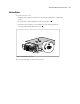
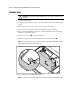
To remove the server cover:
1. Complete the preparation procedures. See “Powering Down the Server” earlier in this
chapter.
2. Loosen the three captive thumbscrews on the rack-mount bezel .
3. Use the grip slot to slide the cover toward the rear of the unit approximately
2.5 cm (1-inch); then lift off the server cover
.
1
2
Figure 2-1. Removing the server cover
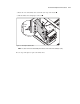
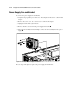
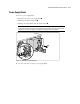
Reverse steps 1 through 3 to replace the server cover.