
ProLiant DL 380 Maintenance and Service Guide

Connectors, Switches, and Status Indicators 4-7
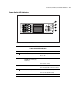
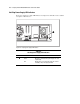
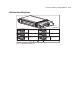
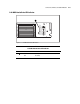
Power Switch LED Indicators
3
2
3
1
4
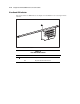
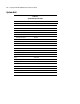
Figure 4-5. Power switch LED indicators
Table 4-5
Power Switch LED Indicators
Item Description Status
Power On/Standby Amber = Standby
Green = On
Disk activity (including the
CD-ROM drive and hot-plug
hard drives)
Green = Drive activity
Off = No drive activity
EMB, NIC link status Green = Embedded NIC linked to network
Off = Embedded NIC not linked to network
EMB, NIC activity Green = Embedded NIC activity
Off = No embedded NIC activity
Note: When in Standby mode, NIC LED indicators are not operational.