
ProLiant DL 380 Maintenance and Service Guide

3-66 Compaq ProLiant DL380 Maintenance and Service Guide
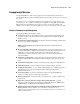
ROMPaq Disaster Recovery
The following option should be utilized by any server that does not have a valid ROM image.
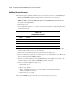
1. Build a fresh ROMPaq diskette, using the latest version for the server involved.
NOTE: If the ROM is corrupted by a ROMPaq interruption, the initial ROMPaq attempt may have affected
the contents of the original diskette.
2. Turn off the server.
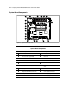
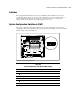
3. Set configuration switches 1, 4, 5, and 6 on the system maintenance switch block to On to
enable disaster mode.
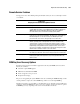
Table 3-24
Configuration Switches
Switch Function
1 Disable on-board graphics
4 Disable diskette drive
5 Disable password
6 Clear NVRAM
4. Insert the ROMPaq diskette. Although you will utilize a normal ROMPaq diskette, this
situation will not allow you to save the old image.
5. Turn on the server. The keyboard, mouse and monitor are all inactive.
6. The server makes two long beeps, to indicate that you are in Disaster Recovery Mode and
that you should insert the ROMPaq diskette.
7. The server reads the diskette for the latest ROM image. If the diskette is not in place, the
system continues to beep until a valid ROMPaq diskette is inserted.
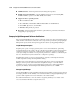
8. After successful completion of this process,
a. Turn off the server.
b. Remove the diskette.
c. Reset configuration switches 1, 4, 5 and 6. (Refer to Configuration Switches
Table 3-24 within this section.)
d. Turn on the server as usual.
After a failed ROMPaq, power down the server and repeat the above process.