
ProLiant DL 380 Maintenance and Service Guide

Diagnostics and Troubleshooting 3-59
If you configure the server to boot into Compaq Utilities, it prepares for remote
communications. You can remotely run Diagnostics software, the Inspect Utility, or the System
Configuration Utility using a workstation running terminal emulation software, such as Compaq
Insight Manager or PC Anywhere.
Booting into the Operating System
When you enable ASR-2 to restart into the operating system and a critical error occurs, ASR-2
logs the error in the IML and restarts the server. The system ROM pages the designated
administrator, then executes the normal restart process.
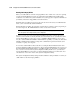
IMPORTANT: When you enable ASR-2 to restart into the operating system, Modem Dial-In Status,
Network Status, and Modem Dial-Out Status are automatically disabled. In this mode, ASR-2 can page
you if a critical error occurs, but you cannot access the server, and the server cannot dial out to a remote
workstation.
If the ASR-2 feature cannot restart the server within 10 attempts, it logs a critical error in the
IML and restarts the server into the Compaq Utilities, and puts the modem into auto-answer
mode.
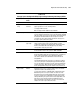
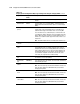
The System Configuration Utility setting should resemble the following when you enable ASR
to restart into the operating system:
Table 3-20
OS Restart SCU Setting for ASR-2
Option Setting
Serial interface COM1
Dial-in status Disabled
Dial-out status Disabled
Dial-out string 555-1234
Network status Disabled
Network protocol IPX
Network controller Compaq
Network host name CPQHOU
Network card slot Slot #
Network frame type ETHERNET_II
Network IP address xxx.xxx.xxx.xxx
Network IP net mask xxx.xxx.xxx.xxx
Network IP router address xxx.xxx.xxx.xxx