
ProLiant DL 380 Maintenance and Service Guide

3-58 Compaq ProLiant DL380 Maintenance and Service Guide
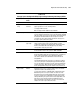
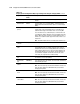
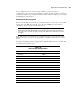
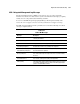
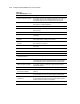
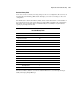
Table 3-19
Compaq System Configuration Utility Pager Settings for Booting into Compaq Utilities
continued
Pager Data Example
Setting
Description
Dial-out string 555-1234 Enter the dial string followed by the remote computer telephone
number.
Network status Enabled To allow network access to Compaq Utilities, set Network Status to
Enabled and ensure that the Reset Boot option is set to Boot Compaq
Utilities.
Network
protocol
To use IPX network access, set Network Protocol to IPX. When the
system restarts to the Compaq Utilities because of an ASR reset, it
loads IPX network support. This enables remote access using NVT.
To use IP network access, set Network protocol to IP. Also make sure
to set Network IP address, Network IP net mask, and Network IP router
address. When the system restarts to the Compaq Utilities because of
an ASR reset, it loads IP network support. This enables remote access
using Telnet.
Note: The Network Status must be set to Enabled for network access.
Network
controller
Compaq For all Compaq standard network controllers.
Network host
name
CPQHOU Enter the network name of the server. Use underscores instead of
spaces within the name—for example, Compaq_Server. If you are
using IPX network access to the Compaq Utilities, this server name is
used to advertise NVT host services. This server name displays in the
Compaq Insight Manager server list when the program determines it
can communicate using NVT. Set this name to be the same as the
server name you assign when the host OS is running.
Network card
slot
Slot # Select the slot number of the network interface card you wish to use
for network access to Compaq Utilities.
Network frame
type
ETHERNET_I I Select the frame type for the network. Selections include both Ethernet
and Token Ring topologies.
Network IP
address
xxx.xxx.xxx.xxx Enter the IP address for this server in standard dot notation.
Note: This is not used if you select Custom for Network controller. You
must enter the IP address in the NET.CFG file that you load into the
Compaq system partition.
Network IP net
mask
xxx.xxx.xxx.xxx Enter the net mask for this server in standard dot notation.
Note: This is not used if you select Custom for network controller. You
must enter the IP address in the NET.CFG file that you load into the
Compaq system partition.
Network IP
router address
xxx.xxx.xxx.xxx Enter the router to be used for this server in standard dot notation.
Note: This is not used if you select Custom for network controller. You
must enter the IP address in the NET.CFG file that you load into the
Compaq system partition.