
Compaq ProLiant DL380 Setup and Installation Guide

Installing Hardware Options
3-23
Compaq Confidential – Need to Know Required
Writer:
Gilbert Saldivar
Project:
Compaq ProLiant DL380 Setup and Installation Guide
Comments:
Part Number:
120133-002
File Name:
d-ch03 Installing Hardware Options.doc
Last Saved On:
12/10/99 1:11 PM
5.
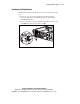
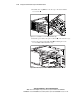
Replace the 1.44-MB diskette drive.
6.
Replace the server access panel.
7.
Push the server into the rack and secure with thumbscrews.
8.
Reconnect the power cord and power on the server.
9.
Reconfigure the server. See Chapter 6, “Server Configuration and
Utilities,” for more information.
Installing a Full-Height Device (DLT Tape Drive)
To install a full-height device into the removable media bay area:
1.
To gain access to the screws securing the removable media trays,
remove the diskette drive by following the steps in “Removing the
1.44-MB Diskette Drive.”
2.
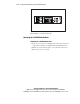
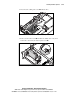
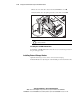
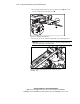
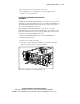
Remove the two T-15 Torx screws securing the media trays to the
chassis and slide the trays out of the server.
Figure 3-23. Removing the two removable media trays from the removable
media cage