
Compaq ProLiant DL380 Setup and Installation Guide

Installing Hardware Options
3-21
Compaq Confidential – Need to Know Required
Writer:
Gilbert Saldivar
Project:
Compaq ProLiant DL380 Setup and Installation Guide
Comments:
Part Number:
120133-002
File Name:
d-ch03 Installing Hardware Options.doc
Last Saved On:
12/10/99 1:11 PM
Installing a Half-Height Device
Install a half-height removable media device into the removable media bay
area:
1.
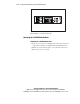
To gain access to the screws securing the removable media trays,
remove the diskette drive by following the steps in “Removing the
1.44-MB Diskette Drive.”
2.
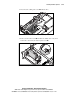
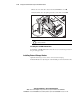
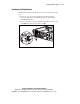
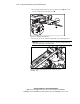
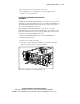
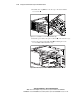
Remove the T-15 Torx screw securing the removable media tray to the
chassis 1 and slide the tray out of the server 2.
1
2
Figure 3-20. Removing the removable media tray from the server