
Compaq ProLiant DL380 Setup and Installation Guide

3-20
Compaq ProLiant DL380 Setup and Installation Guide
Compaq Confidential – Need to Know Required
Writer:
Gilbert Saldivar
Project:
Compaq ProLiant DL380 Setup and Installation Guide
Comments:
Part Number:
120133-002
File Name:
d-ch03 Installing Hardware Options.doc
Last Saved On:
12/10/99 1:11 PM
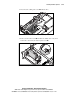
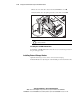
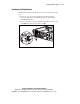
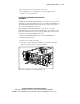
6.
Rotate the rear of the drive away from the CD-ROM drive area 3.
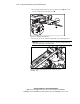
7.
Lift the diskette drive straight up and remove it from the chassis. 4
4
3
Figure 3-19. Removing the diskette drive
CAUTION:
When removing or installing the diskette drive be careful not damage
its front eject button.
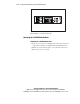
Installing the 1.44-MB Diskette Drive
To install the 1.44-MB diskette drive into the server, reverse the steps noted in
the preceding procedure.
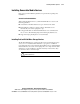
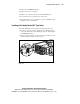
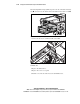
Installing External Storage Devices
Optional mass storage devices can be connected to the Compaq
ProLiant DL380 server by using the external SCSI port on the back of the unit.