
Compaq ProLiant DL380 Setup and Installation Guide

Installing Hardware Options
3-17
Compaq Confidential – Need to Know Required
Writer:
Gilbert Saldivar
Project:
Compaq ProLiant DL380 Setup and Installation Guide
Comments:
Part Number:
120133-002
File Name:
d-ch03 Installing Hardware Options.doc
Last Saved On:
12/10/99 1:11 PM
Installing Removable Media Devices
Refer to the general installation guidelines for general rules regarding drive
installation.
General Installation Guidelines
When adding SCSI hard drives to your ProLiant DL380 server, observe the
following guidelines:
■
A maximum of 15 Wide Ultra2 devices per channel can be added.
■
Each SCSI drive must have a unique address. SCSI addresses are
automatically set for the hot-plug drive cage.
■
Compaq SCSI cables for the ProLiant DL380 server are terminated. Be
sure to remove all terminating jumpers from third-party SCSI devices.
■
Supported Compaq SCSI options are not terminated.
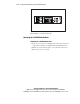
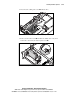
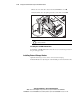
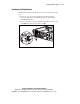
Installing ProLiant DL380 Mass Storage Devices
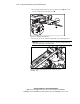
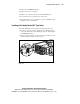
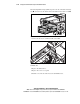
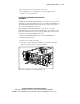
The ProLiant DL380 server contains four drive bays for internal mass storage
devices. A 2 x 1-inch Wide Ultra2 SCSI drive cage option is available for
removable media bays 4 and 5 allowing the installation of two additional Wide
Ultra2 SCSI drives for a total of six hot-plug drives on a single channel. Other
SCSI devices can be installed in removable media bays 4 and 5. These bays
are 5.25 inches wide x 1.6 inches high.
CAUTION:
The ProLiant DL380 server does not support the installation of IDE or
EIDE fixed disk drives.