
Compaq ProLiant DL380 Setup and Installation Guide

Installing Hardware Options
3-15
Compaq Confidential – Need to Know Required
Writer:
Gilbert Saldivar
Project:
Compaq ProLiant DL380 Setup and Installation Guide
Comments:
Part Number:
120133-002
File Name:
d-ch03 Installing Hardware Options.doc
Last Saved On:
12/10/99 1:11 PM
Replacing the Riser Board and
Riser Board Brace
The following procedure outlines the steps for replacing the riser board and the
riser board brace.
NOTE:
Replacing the riser board is optional
1.
If the server is on, place it in Standby mode and disconnect the power
cords. See to Chapter 2, “Installing the ProLiant DL380 Server.”
2.
Remove the server access panel.
3.
Remove all expansion boards by reversing the steps in the “Installing an
Expansion Board” procedure.
4.
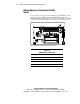
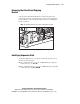
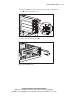
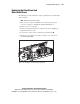
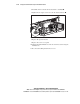
Loosen the two captive screws securing the riser board brace 1.
5.
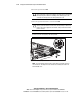
Lift the riser board and riser board brace out of the server as shown in
the following figure 2.
1
2
Figure 3-14. Removing the riser board and riser board brace