
Compaq ProLiant DL380 Setup and Installation Guide

3-14
Compaq ProLiant DL380 Setup and Installation Guide
Compaq Confidential – Need to Know Required
Writer:
Gilbert Saldivar
Project:
Compaq ProLiant DL380 Setup and Installation Guide
Comments:
Part Number:
120133-002
File Name:
d-ch03 Installing Hardware Options.doc
Last Saved On:
12/10/99 1:11 PM
6.
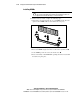
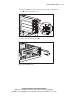
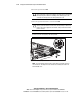
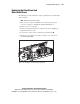
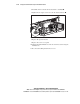
Insert the expansion board 4.
CAUTION:
To avoid the risk of damage to your system or expansion boards,
remove all AC power cords before installing or removing expansion boards. With
the front panel power switch in the Standby position, auxiliary power is still
connected to the PCI expansion slot and may damage the card.
7.
Close the expansion slot latch to secure the board 5.
CAUTION:
Moving your server Power On/Standby switch to the Standby position
removes power from most areas of the server; this may take up to 30 seconds.
Portions of the power supply and some internal circuitry remain active until AC
power is removed.
IMPORTANT:
When you install a board, make sure you press firmly on the board so that
the entire connector seats properly in the riser board slot.
4
5
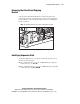
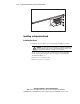
Figure 3-13. Inserting an expansion board
NOTE:
Some full-length PCI boards include a plastic adapter to allow full retention in
some shared slots. This adapter must be removed before installing the boards in the
ProLiant DL380 server.