
Compaq ProLiant DL380 Setup and Installation Guide

3-10
Compaq ProLiant DL380 Setup and Installation Guide
Compaq Confidential – Need to Know Required
Writer:
Gilbert Saldivar
Project:
Compaq ProLiant DL380 Setup and Installation Guide
Comments:
Part Number:
120133-002
File Name:
d-ch03 Installing Hardware Options.doc
Last Saved On:
12/10/99 1:11 PM
Installing DIMMs
CAUTION:
Electrostatic discharge can damage electronic components. Be sure
you are properly grounded before beginning any installation procedure. See
Appendix B, “Electrostatic Discharge,” for more information.
To install a memory module, complete the following steps:
1.
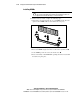
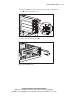
Align the key slot in the bottom edge of each DIMM with the tab in the
expansion slot. DIMMs will not seat if turned the wrong way.
2
2
1
Figure 3-8. Aligning DIMM in a memory expansion slot
2.
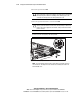
Insert each DIMM straight down into a socket on the system board 1.
3.
As the DIMM goes into the socket, the latches close 2.
4.
Press down firmly on the DIMM while pushing the latches inward until
the latches snap into place.