
Compaq ProLiant DL380 Setup and Installation Guide

Installing Hardware Options
3-9
Compaq Confidential – Need to Know Required
Writer:
Gilbert Saldivar
Project:
Compaq ProLiant DL380 Setup and Installation Guide
Comments:
Part Number:
120133-002
File Name:
d-ch03 Installing Hardware Options.doc
Last Saved On:
12/10/99 1:11 PM
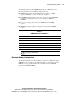
The following table describes DIMM Option Kits. You must observe the
following guidelines when installing additional memory:
■
DIMMs installed in the ProLiant DL380 server must be 133-MHz
registered SDRAM, 3.3-volts, 72-bits wide, and ECC.
■
All DIMMs installed must be of the same speed. Do not install DIMM
modules supporting different speeds, for example 133 MHz and
100 MHz.
■
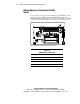
The server is shipped with at least one DIMM located in DIMM
socket 1.
■
DIMMs should be installed in sequential order starting with DIMM
socket 1.
Table 3-3
DIMM Option Kit Part Numbers
Part Numbers DIMM Option Kit Description
128276-B21 64-MB option kit
128277-B21 128-MB option kit
128278-B21 256-MB option kit
128279-B21 512-MB option kit
128280-B21 1-GB option kit (when available)
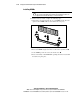
CAUTION:
Use only Compaq DIMMs. DIMMs from other sources are known to
adversely affect data integrity.
Maximum Memory Configuration
The ProLiant DL380 server allows ultimate expansion to 4-GB (when 1-GB
DIMMS become available). In the maximum memory configuration, all four
DIMM
sockets
are populated with 1-GB, 133-MHz, registered SDRAM
(Synchronous DRAM) DIMMs.