
Compaq ProLiant DL380 Setup and Installation Guide

3-6
Compaq ProLiant DL380 Setup and Installation Guide
Compaq Confidential – Need to Know Required
Writer:
Gilbert Saldivar
Project:
Compaq ProLiant DL380 Setup and Installation Guide
Comments:
Part Number:
120133-002
File Name:
d-ch03 Installing Hardware Options.doc
Last Saved On:
12/10/99 1:11 PM
Installing a Processor Power Module
Every processor supplied by Compaq comes with a Processor Power Module
(DC-to-DC converter). Each PPM must be installed in the slot adjacent to its
processor to provide power to that processor. If the processor is installed in
slot 1, install the PPM in slot 1. If the processor is installed in slot 2, install the
PPM in slot 2.
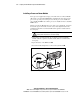
The Processor Power Module is keyed to ensure correct alignment. A notch in
the bottom edge of the module, near the center, must align with a tab in the
mounting bracket. The notch and tab will not line up if the module is turned
the wrong way.
WARNING:
To reduce the risk of personal injury from hot surfaces, allow the
internal system components to cool before touching.
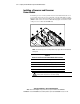
1.
Align the key slot in the bottom edge of the Processor Power Module
with the tab in the expansion slot. The module will not seat if turned the
wrong way.
2.
Open the latches on the PPM socket 1.
3.
Insert the module straight into a socket on the system board 2.
2
1
1
Figure 3-6. Installing a Processor Power Module (PPM)