
Compaq ProLiant DL380 Setup and Installation Guide

3-4
Compaq ProLiant DL380 Setup and Installation Guide
Compaq Confidential – Need to Know Required
Writer:
Gilbert Saldivar
Project:
Compaq ProLiant DL380 Setup and Installation Guide
Comments:
Part Number:
120133-002
File Name:
d-ch03 Installing Hardware Options.doc
Last Saved On:
12/10/99 1:11 PM
Installing a Processor and Processor
Power Module
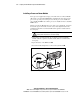
To install a processor on the system board, refer to the label inside the server
access panel, refer to the processor option kit, or use the following procedure.
This procedure can be used to install a processor and Processor Power Module
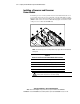
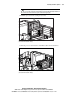
(PPM) in either socket 1 or socket 2. The following figure shows the location
of the processor sockets and the PPM slots.
Figure 3-3. Processor and PPM slot locations
NOTE:
Heat sink and processor mounting hardware may appear different than illustrated
in this guide.
Table 3-1
Processor and Processor Power Module Slot Locations
Number Description
1
Processor Power Module slot 1 (populated)
2
Processor slot 1 (populated)
3
Processor Power Module slot 2 (unpopulated)
4
Processor slot 2 (unpopulated)
WARNING:
To reduce the risk of personal injury from hot surfaces, allow the
internal system components to cool before touching.