
Compaq ProLiant DL380 Setup and Installation Guide

Installing the ProLiant DL380 Server
2-29
Compaq Confidential – Need to Know Required
Writer:
Gilbert Saldivar
Project:
Compaq ProLiant DL380 Setup and Installation Guide
Comments:
Part Number:
120133-002
File Name:
c-ch02 Server Installation Overview.doc
Last Saved On:
12/10/99 1:04 PM
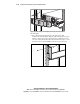
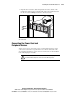
3.
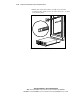
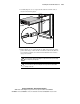
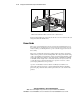
Align the other end of the cable management arm on the outside of the
rack bracket attached to the rack. Attach the arm to the rack bracket with
two 10-32 x 5/8-inch Phillips washer-face hex-head screws.
Figure 2-24. Attaching the cable management arm to the cable management
arm rack bracket
Connecting the Power Cord and
Peripheral Devices
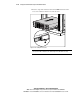
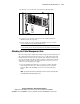
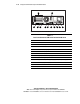
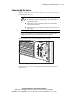
You are now ready to connect the power cord and peripheral devices to the
connectors located on the rear panel of the server. Icons on the back of the
server identify the function of each connector. Connectors are also identified
in the following figure and table.
WARNING:
To reduce the risk of electrical shock or fire, do not plug
telecommunications/telephone connectors into the NIC receptacles.