
Compaq ProLiant DL380 Setup and Installation Guide

Installing the ProLiant DL380 Server
2-27
Compaq Confidential – Need to Know Required
Writer:
Gilbert Saldivar
Project:
Compaq ProLiant DL380 Setup and Installation Guide
Comments:
Part Number:
120133-002
File Name:
c-ch02 Server Installation Overview.doc
Last Saved On:
12/10/99 1:04 PM
5.
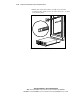
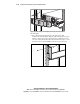
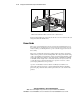
Position the server in the rack, as shown in the following figure.
Figure 2-21. Using thumbscrews to secure the positioned server in the rack
6.
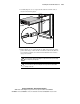
Secure the server faceplate to the front of the rack by fastening the
thumbscrews into the cage nuts.
7.
Before closing the rack door, tighten the thumbscrews to prevent the
door from hitting any protruding thumbscrews.
IMPORTANT:
When servicing the server, fully extend the component until the latches
lock. To return the server to the rack, press the latches and slide the server into the rack.
Attaching the Cable Management Arm
Each server ships with a double-hinged cable management arm with fasteners.
The cable management arm attaches to the server’s cable management arm
bracket and to the rear frame of the rack. All cables leading to and from the
server are tied to this arm. The two hinges allow the cable management arm
with attached cables to swing out of the way when you need to access rear
connectors or the hot-plug power supply.
1.
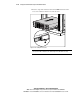
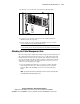
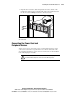
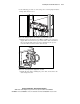
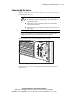
For easier handling, first slide the server into the rack, then attach the
cable management arm to the cable management arm server bracket
using two M6 x 1.0-12L Phillips screws as shown in the following
figure.
NOTE:
If you attach the arm before loading the server in the rack, the arm may swing
around and interfere with the loading process.