
Compaq ProLiant DL380 Setup and Installation Guide

Installing the ProLiant DL380 Server
2-23
Compaq Confidential – Need to Know Required
Writer:
Gilbert Saldivar
Project:
Compaq ProLiant DL380 Setup and Installation Guide
Comments:
Part Number:
120133-002
File Name:
c-ch02 Server Installation Overview.doc
Last Saved On:
12/10/99 1:04 PM
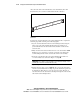
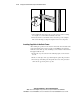
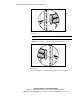
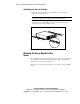
Figure 2-17. Attaching the server bracket to the server
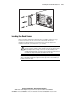
Loading the Rack Server
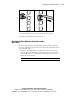
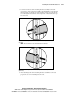
Before attaching additional mounting bracket assemblies, follow the steps
below to load and secure the server to the rack with the front bezel
thumbscrews. Ensure that this pair of brackets is perfectly aligned and
installed and that the server fits before you continue.
WARNING:
To reduce the risk of personal injury or damage to the equipment, at
least two people are needed to safely unload the rack from the pallet. An empty
42U rack weighs 253 lb (115 kg), is over 7 ft (2.1 m) tall, and may become
unstable when being moved on its casters. Do not stand in front of the rack as it
rolls down the ramp from the pallet, but handle it from the sides.
IMPORTANT:
To make the server lighter and more manageable, do not install hot-plug
drives or redundant hot-plug power supplies into their cages in the server until after you
load the server into the rack.