
Compaq ProLiant DL380 Setup and Installation Guide

2-22
Compaq ProLiant DL380 Setup and Installation Guide
Compaq Confidential – Need to Know Required
Writer:
Gilbert Saldivar
Project:
Compaq ProLiant DL380 Setup and Installation Guide
Comments:
Part Number:
120133-002
File Name:
c-ch02 Server Installation Overview.doc
Last Saved On:
12/10/99 1:04 PM
Attaching Server Rails to the Server
1.
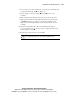
Place the center tab on the server rail with the open end of the tab
toward the front of the server.
IMPORTANT:
The server rails attach to the server with the flat side of the rail against the
server. The holes in the server rail will line up only one way with the chassis.
2.
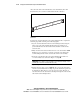
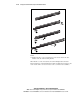
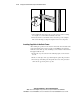
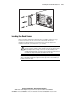
Attach the flat side of a component rail to each side of the server chassis
with three 8-32 x ¼-inch Phillips screws, as shown in the following
figure. Do not use washers with the screws.
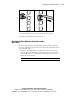
Figure 2-16. Attaching server rails to the server
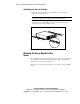
Attaching the Server Bracket to the
Server
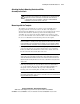
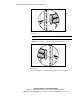
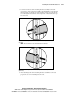
The server bracket fastens to the left side of the rear of the server chassis. The
server bracket provides an attachment point for the cable management arm
from the server to the rear frame of the rack.
Attach the server bracket to the back of the server with two 6-32 x ¼ Phillips
screws.