
Compaq ProLiant DL380 Setup and Installation Guide

Installing the ProLiant DL380 Server
2-19
Compaq Confidential – Need to Know Required
Writer:
Gilbert Saldivar
Project:
Compaq ProLiant DL380 Setup and Installation Guide
Comments:
Part Number:
120133-002
File Name:
c-ch02 Server Installation Overview.doc
Last Saved On:
12/10/99 1:04 PM
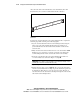
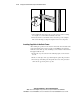
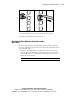
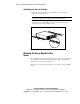
Figure 2-11. Inserting cage nuts
4.
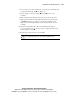
Using the fitting tool as a lever, pry the cage nut into position.
5.
Repeat Steps 1 through 4 for each cage nut.
Attaching the Rack Mounting Bracket Assembly
to the Rack
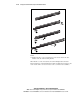
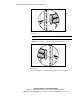
The tabs on the front of the rack mounting bracket help to align it with the
front of the rack frame. Cage nuts are not used for the front attachment of the
rack mounting bracket.
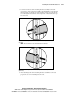
1.
Attach a rack-mounting bracket assembly to the front of the rack first,
using one M6 x 1.0-12L Phillips screw in the bottom hole of the left side
of the bracket and one screw in the bottom hole of the right side of the
bracket. Do not use washers.
IMPORTANT:
Do not use washers with the screws in the rack assembly.