
Compaq ProLiant DL380 Setup and Installation Guide

Installing the ProLiant DL380 Server
2-15
Compaq Confidential – Need to Know Required
Writer:
Gilbert Saldivar
Project:
Compaq ProLiant DL380 Setup and Installation Guide
Comments:
Part Number:
120133-002
File Name:
c-ch02 Server Installation Overview.doc
Last Saved On:
12/10/99 1:04 PM
6.
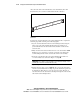
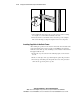
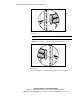
Use one more 8-32 x ¼-inch slotted screw to fasten the outer bracket rail
to the rack-mounting bracket 4. See Figure 2-9.
7.
Refer to Figure 2-9 and repeat Steps 1 through 4 for the second
assembly.
8.
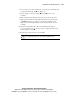
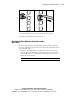
Fully extend the inner slides from the front of each outer bracket rail.
9.
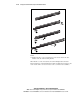
Fully extend toward the front the ball-bearing slide located in the inner
slide 5. With these pieces extended, a screw hole toward the center
aligns in the rack-mounting bracket and the outer bracket rail for each
assembly.
10.
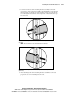
Fasten the outer bracket rail to the rack-mounting bracket with an
8-32 x ¼-inch slotted screw.
Do not use nuts or washers with the screw.
Refer to Figure 2-9, Step 6.
11.
Repeat the procedure for the second assembly.
IMPORTANT:
The outer bracket rails must be mounted on the inside holes of
the rack mounting bracket or the server will sit too high in the rack.