
Compaq ProLiant DL380 Setup and Installation Guide

2-12
Compaq ProLiant DL380 Setup and Installation Guide
Compaq Confidential – Need to Know Required
Writer:
Gilbert Saldivar
Project:
Compaq ProLiant DL380 Setup and Installation Guide
Comments:
Part Number:
120133-002
File Name:
c-ch02 Server Installation Overview.doc
Last Saved On:
12/10/99 1:04 PM
Attaching the Outer Bracket Rail to the Rack Mounting
Bracket
1.
Place the two slide rail assemblies, the two rack mounting brackets, and
the 4 ¼-in fasteners on a flat surface.
2.
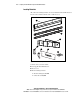
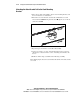
Extend the server rail from the outer bracket rail until the server rail
release latch clicks 1. Holding down the latch 2, slip the server rail out
of the inner slide 3.
1
3
2
Figure 2-5. Removing the server rail from the outer bracket rail
3.
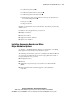
Repeat Steps 1 and 2 for the second slide rail assembly.
4.
Set the server rails to one side. You will attach them to the rack server
chassis later, as discussed in the section, “Attaching Server Rails to the
Server.”
5.
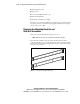
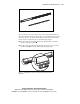
Build two mirror image assemblies of the following assembly.
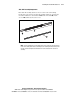
The following figure shows the outer bracket rail with the inner slide and the
server rail.